








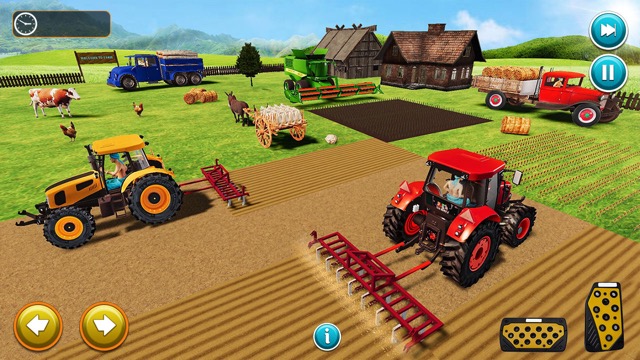
1. Harvest Simulator Game Overview
Harvest Simulator drops you straight into the most satisfying moment of any farming experience — the harvest. Skip the waiting, skip the watering, and get right to the action: climbing into a powerful red harvester and systematically collecting fields full of wheat, corn, sunflowers, cabbages, tomatoes, and pumpkins. Each field is a new seasonal challenge, and the reward is the deeply satisfying rhythm of crop collection, produce sales, and machine upgrades.
What makes Harvest Simulator special is its laser focus on mechanical farming joy. Rather than managing growth cycles or nurturing seedlings, you become a harvesting operator — planning efficient routes across open farmland, monitoring your storage capacity, and optimizing every run for maximum profit. The game rewards smart thinking as much as quick reflexes: the most successful harvests come from deliberate route planning, timely barn returns, and well-chosen upgrades.
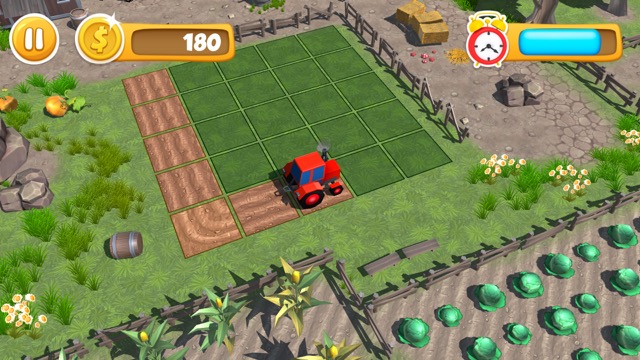
Visually, the game presents a clean, calming low-poly 3D world stretching to the horizon — wide golden fields, distant wind turbines, rolling green hills, and the warm hum of your engine cutting through rows of ripe crops. The ambient sounds of birds and nature layer perfectly over the mechanical rhythm of harvesting, creating a uniquely meditative yet purposeful atmosphere.
Whether you're a casual player who loves the feel-good loop of clearing a field, or a strategic thinker optimizing every harvest run, Harvest Simulator delivers a uniquely rewarding take on the farming genre.
Key Details:
Genre: Farming Simulation / Vehicle Operation
Difficulty Level: Easy to Medium (deeper with strategic optimization)
Average Play Time: 20–40 minutes per session
Best For: Fans of simulation games, players who enjoy vehicle mechanics, casual gamers seeking a relaxing yet satisfying loop
2. How to Play Harvest Simulator
Getting Started:
Select a field to harvest — each field features a different crop type and seasonal setting.
Start your red harvester and drive into the crop rows to begin collecting.
Monitor the Load Meter on the right side of the screen — when it fills up, return to the barn to unload.
Sell your collected produce at the barn to earn money.
Reinvest your earnings into harvester upgrades — speed, blade width, and storage capacity — then tackle the next field.
Basic Controls:
W / Up Arrow — Move forward
S / Down Arrow — Reverse
A / D or Left / Right Arrow — Turn your harvester
E — Toggle between wide and close camera views
M — Toggle sound on/off
Mouse Click — Navigate menus and confirm upgrades
Note: Harvest Simulator is currently optimized for keyboard and mouse. Mobile touch controls are not yet available.
Objective:
Efficiently harvest as many crops as possible across each field before your storage fills up, then sell your produce at the barn for coins. Use those earnings to upgrade your harvester and take on larger, more productive fields. The goal is maximum efficiency — the cleaner and faster your harvest, the higher your profits.
3. Harvest Simulator Features & Highlights
- Six Distinct Crop Types — Harvest wheat, corn, sunflowers, cabbages, tomatoes, and pumpkins across varied seasonal fields, each with its own visual character
- Harvester Upgrade System — Invest in blade width, speed, and storage capacity to fundamentally change how you approach each harvest run
- Strategic Route Planning — No two harvests are the same; optimal zigzag and spiral routes make the difference between a good run and a great one
- Dual Camera System — Switch between a wide overhead view for navigation and a close-up view for precision harvesting in tight spots
- Peaceful Low-Poly 3D World — Immerse yourself in a calming open farmland environment complete with ambient nature sounds, distant wind turbines, and bright, realistic lighting
4. Harvest Simulator Tips & Strategies
Beginner Tips:
Watch the Load Meter constantly: Return to the barn before it hits 100% — overfilling wastes time and potential earnings from crops you drive past.
Start with straight rows: Drive in clean parallel lines across the field before attempting complex patterns; it's the fastest way to cover ground early on.
Sell after every run: Don't hold onto produce — cash out at the barn regularly so you can start upgrading your harvester sooner.
Advanced Strategies:
Prioritize storage upgrades first: A larger storage capacity means fewer barn trips per field, dramatically increasing your income per minute of harvesting.
Use the wide camera at field edges: Switch to the wide view when turning at the end of rows to plan your next pass and avoid missing crop strips.
Optimize a spiral pattern for large fields: Start from the outside and work inward in a tightening spiral — it minimizes backtracking and keeps your harvester moving efficiently at all times.
What to Watch Out For:
Missing crop strips: Driving too fast around corners often leaves unharvested rows behind. Slow down at the edges and use the wide camera to verify full coverage.
Neglecting speed upgrades late-game: Once your storage is large, a slow harvester becomes the bottleneck. Balance your upgrades across all three categories — speed, blades, and storage — as your fields grow larger.
5. Harvest Simulator Game Elements Explained
The Harvester & Upgrade System:
Your red harvester is more than a vehicle — it's your primary tool, avatar, and strategic asset all in one. It begins with modest stats: limited cutting width, average speed, and a small storage tank. As you earn money from selling produce, you can invest in three core upgrades. Blade width determines how many crop rows you cut in a single pass — wider blades mean fewer passes needed to clear a field. Speed controls how fast you traverse the field — critical for large fields where travel time eats into profits. Storage capacity determines how much produce you can carry before needing a barn run — the most impactful early upgrade. Each upgrade meaningfully changes your harvesting strategy, not just your numbers, making the upgrade system feel genuinely rewarding rather than just a stat increase.
The Load Meter & Barn System:
The Load Meter, displayed on the right side of the screen, is your most important real-time indicator. It tracks how full your harvester's storage tank is as you collect crops. Reaching 100% doesn't just stop you from collecting — it means every crop your harvester rolls over afterward is wasted entirely. Efficient barn management is the core skill that separates casual players from top-tier harvesters. The ideal pattern is to begin a barn return trip when the meter reaches around 80–85%, giving you time to complete one more clean row before heading back. Each barn visit automatically converts your load into cash, which you can immediately spend on upgrades. Building this return-sell-upgrade loop into a tight, efficient rhythm is the real gameplay mastery in Harvest Simulator.
Field & Crop Variety:
Each field in Harvest Simulator represents a different crop type and seasonal atmosphere, keeping the experience visually fresh and strategically varied. Wheat fields tend to be wide and open, rewarding long straight-line runs. Corn and sunflower fields offer denser crop layouts where blade width matters more. Cabbage, tomato, and pumpkin patches may involve tighter rows and more frequent turns, testing your route-planning precision. Beyond aesthetics, different crop types carry different sale values, influencing which fields are most worth prioritizing as you scale up. The low-poly 3D design makes each crop instantly distinguishable by color and shape from the driver's seat, helping you plan visual routes at a glance. Progressing through different fields gives the game a natural sense of seasonal journey — from golden wheat to autumn pumpkins.
6. Harvest Simulator FAQ
Q: How do I start harvesting a field?
A: After selecting a field from the menu, your harvester will spawn at the field edge. Drive forward into the crop rows using W or the Up Arrow — your harvester will automatically collect crops as it passes over them. Just keep moving and watch your Load Meter.
Q: What should I do if my Load Meter fills up mid-field?
A: Stop collecting and drive directly to the barn to unload. Continuing to harvest at 100% capacity means all additional crops are lost. After selling at the barn, return to the field and pick up where you left off. Upgrade your storage capacity to reduce how often this happens.
Q: Is Harvest Simulator playable on mobile or tablet?
A: Currently, Harvest Simulator is optimized for desktop play with keyboard and mouse controls. Mobile touch button support is not yet available, so a computer with a keyboard is recommended for the full experience.
Q: Does the game save my progress and upgrades?
A: Yes — your harvester upgrades and earned money are saved automatically as you play. Return to the game in the same browser session to continue with your upgraded harvester. Clearing browser data may reset your progress, so avoid doing so if you want to preserve your farm earnings.
Q: How do I unlock new fields and crop types?
A: New fields become available as you earn money and progress through the game. Focus on completing your current field efficiently, selling your produce, and upgrading your harvester — new seasonal fields and crop varieties will unlock as you hit earnings milestones.
7. Games Like Harvest Simulator
If you like Harvest Simulator, you might also enjoy:
- FarmLand - It expands the farm-management side with crops, animals, workers, and market decisions.
- Train Tycoon - It rewards the same kind of route efficiency and upgrade planning in a transport business setting.